
IBAN Validation
The IBAN Validation extension provides real-time IBAN verification through external validation services for Microsoft Dynamics 365 Business Central. It validates International Bank Account Numbers (IBAN) against external providers and can automatically retrieve associated bank information such as BIC/SWIFT codes, bank names, and addresses.
This extension is designed as a shared base component and is included free of charge with the following extensions:
- Vendor Bank Approval Workflow — for vendor bank account management
- Customer Bank Approval Workflow — for customer bank account management
Both extensions leverage IBAN Validation to ensure that bank account data is accurate and verified before being used in payment or collection processes.
#Validation Providers
The IBAN Validation extension supports two external validation providers. Each provider offers IBAN verification and bank information retrieval, but through different technologies and service models.
IBAN Analyzer
IBAN Analyzer is an online IBAN validation service provided by iban-analyzer.com. The subscription is managed directly through the provider's website. Once subscribed, simply enter your API token in the IBAN Validation Setup page to start validating IBANs and retrieving bank information.
IBAN Rechner
IBAN Rechner is an online IBAN validation service provided by Theano GmbH. The subscription is managed directly through the provider's website. Once subscribed, enter your login and password in the IBAN Validation Setup page to start validating IBANs and retrieving bank information.
If you require integration with a different IBAN validation provider, please contact us. We will be happy to implement it for you.
#Setup
Before using IBAN validation features, the system must be configured through the IBAN Validation Setup page.
To configure the IBAN Validation Setup:
- Choose the search icon, enter "IBAN Validation Setup", then choose the related link.
- In the "Validation Provider" field, select one of the available providers: None (default), IBAN Analyzer, or IBAN Rechner.
- Configure the provider credentials using the actions in the ribbon.
- In the "Vendor Bank Account" section, enable "Auto check Vendor IBAN" if you want automatic IBAN validation when an IBAN is entered on a vendor bank account.
- In the "Customer Bank Account" section, enable the same option for customer bank accounts.
- Set the "Bank Info Retrieval Mode" for each section: Never, Automatic, or With Confirmation.
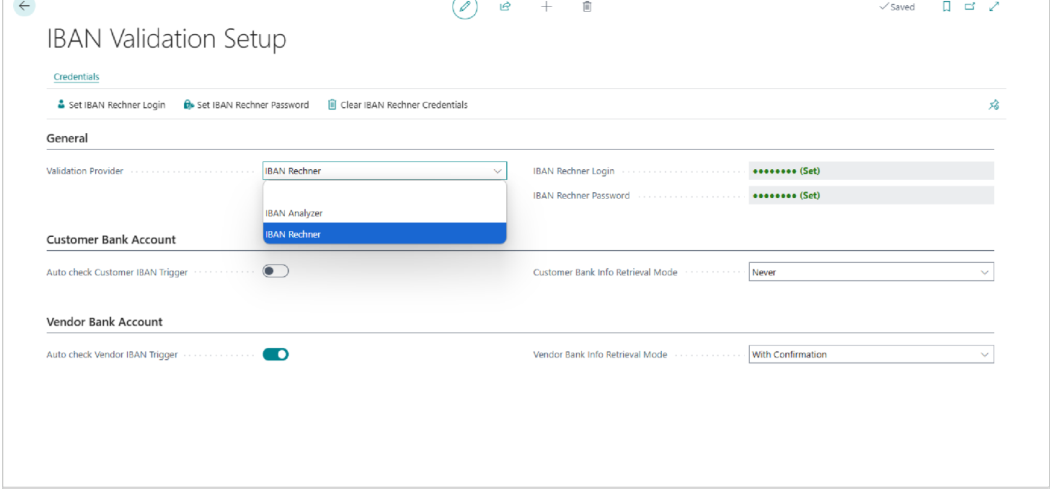
All credentials are stored securely in Business Central Isolated Storage (encrypted). They are never visible in plain text after being saved. Changing the validation provider automatically clears the previous provider credentials.
#Validating an IBAN
Once the IBAN Validation Setup is configured, IBAN validation can be performed from both vendor and customer bank account cards, either automatically or manually.
Automatic Validation
When Auto check Customer/Vendor IBAN is enabled in the IBAN Validation Setup, the system automatically validates the IBAN each time it is entered or modified on a bank account card. The bank account must be in "Open" status (if the approval workflow is active). If the IBAN is valid, a confirmation message is displayed. If the IBAN is invalid, the system displays an error.
Manual Validation
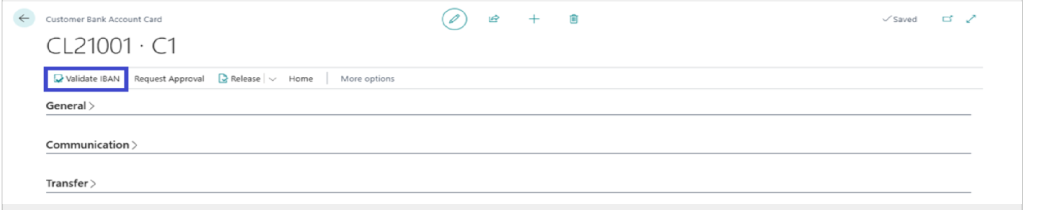
A "Validate IBAN" button is available in the Processing section of both the Vendor Bank Account Card and Customer Bank Account Card ribbon. To validate manually:
- Open a Vendor Bank Account Card or Customer Bank Account Card.
- Ensure the "IBAN" field is filled.
- Click the "Validate IBAN" action in the ribbon.
- The system calls the validation provider and displays the result.

IBAN validation requires an active internet connection and a valid subscription or API key for the selected provider. If the external service is unreachable, an error will be displayed.
#Bank Information Retrieval
During IBAN validation, the system can automatically retrieve bank information (bank name, address, BIC/SWIFT code) from the external validation service and update the bank account record. This applies to both vendor and customer bank accounts.
The behavior is controlled by the "Bank Info Retrieval Mode" setting in the IBAN Validation Setup. There are three modes:
- Never: The system validates the IBAN only. No bank information is retrieved or updated.
- Automatic: The system automatically retrieves and applies bank information (Name, Address, City, Post Code, Country/Region Code, SWIFT Code, Bank Account No.) after successful validation.
- With Confirmation: The system retrieves bank information and displays a side-by-side comparison dialog. The user must confirm before values are applied.
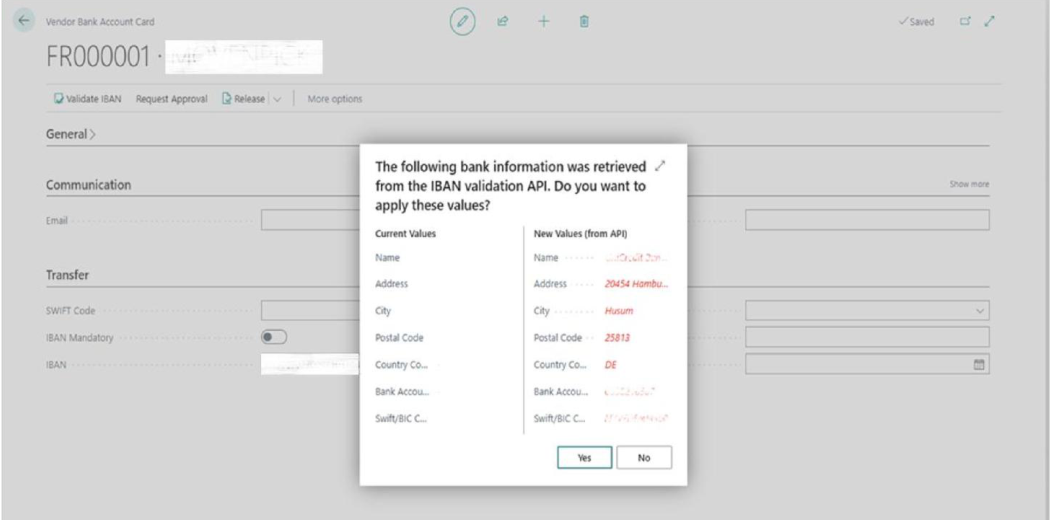
Bank information can only be applied when the bank account status is "Open". If the account is "Released" or "Pending Approval", the retrieved values cannot be written to the record.
#Integration with Consuming Extensions
The IBAN Validation extension is designed as a shared component consumed by two separate approval workflow extensions. Each consuming extension integrates through events, allowing independent configuration per bank account type.
Vendor Bank Approval Workflow
When the Vendor Bank Approval Workflow extension is installed, the IBAN Validation Setup page displays a "Vendor Bank Account" section with dedicated settings for automatic IBAN checking and bank info retrieval mode. The Validate IBAN action is available on the Vendor Bank Account Card and List pages. IBAN validation triggers when the IBAN field is modified, and bank information is applied to vendor bank account fields.
Customer Bank Approval Workflow
When the Customer Bank Approval Workflow extension is installed, the same setup and functionality is available for customer bank accounts through a dedicated "Customer Bank Account" section.
Independent Configuration
Each consuming extension has its own settings section on the IBAN Validation Setup page. This means you can configure different behaviors for vendor and customer bank accounts. For example:
- Vendor bank accounts: Automatic IBAN check enabled, Bank Info Retrieval = With Confirmation
- Customer bank accounts: Automatic IBAN check disabled, Bank Info Retrieval = Never
This flexibility allows organizations to apply stricter controls on vendor payments while keeping lighter validation on customer collections, or vice versa.
#Permission Set
The following permission set must be assigned to users who need access to the IBAN Validation features:
"IBAN Validation" — provides execute access to all IBAN validation pages and codeunits, plus full data access to the IBAN Validation Setup table.
This permission set is required in addition to the permission sets of the consuming extensions (Vendor Bank Approval Workflow or Customer Bank Approval Workflow). Users need both to access the full functionality.